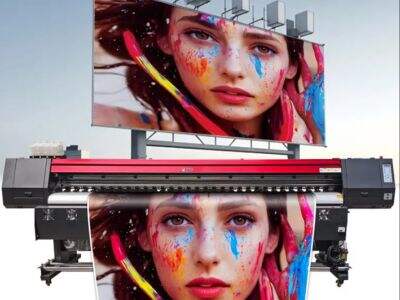
Large format printers is special machines that make big, clear prints. They usually use for banners, signs, and other large images. To keep these prints looking good, large format printers use various ways to hold print accuracy. This mean the colors, details, and whole look match what customer want. Xoto, a top company in this area, focus on these techniques to give high-quality prints always. Knowing how these printers work help buyers choose better when they need big prints.
What Wholesale Buyers Should Know About Print Accuracy in Large Format Printing?
When wholesale buyers think on print accuracy, they need to look at some key points. First, the tech in big format printing are very advanced. These printers often use inkjet method, which produce detailed images. The print quality also depend on the ink type. Some inks work better for outside use, while other good for inside. Buyers must know that difference. Next, the paper or material for printing is just as important. Different materials affect how colors show and how long print last. For example, canvas give different look than vinyl. It's key to think about printer settings too. The resolution change how sharp the image is. Higher resolution mean clearer images but it take more time to print. In addition, buyers should ask for color matching. Colors sometimes look different on screen than in the print. Companies like Xoto have color profiles to make sure what you see on computer match the print. Finally, talking is important. Buyers need work close with printing companies so they understand needs and what expect. That way, the final product come out just as wanted.
What Common Issues Affect Print Accuracy in Large Format Printing?
There some common problems that can mess with print accuracy in large format printing. One main issue is misalignment, which happen when print not line up right. This lead to blurry images or parts cut off. Another problem is color not consistent. Colors can appear different from expected because of lighting or materials. For instance, a bright yellow might look dull on some paper. To fight this, companies like Xoto use color calibration tools. These tools help keep colors same during printing. Dust and dirt also cause trouble. If printer not clean, it leave spots or lines on prints. Regular maintenance is needed to stop this. Additionally, the ink type can make issues too. Not all inks dry same, and some smudge if not dry proper. To avoid, follow maker's guidelines for drying. Lastly, temperature and humidity play role. If too humid or cold, it affect how ink stick to material. Keeping printing area controlled is important. By know these issues, buyers can team up with printing companies to dodge pitfalls and make prints look great.
What Best Practices for Keeping Print Accuracy in Large Format Printing?
Large format printers are special machines that print big pictures, signs, and banners. To make sure they work well and print right, there some steps to follow. First, keep the printer clean is crucial. Dirt and dust get in and ruin prints. Clean the parts like print heads and rollers regular help everything run smooth. Xoto suggest use a soft dry cloth for outside and special solution for inside, as per instructions.
Another good practice is use high-quality ink and paper. With right materials, colors come bright and clear. Xoto offer inks and papers that work together perfect. This avoid fading or dull colors. Check ink cartridges full and paper loaded right before print job.
You also should check printer settings often. Make sure select right paper size and type in settings. This help printer know to print correct. Xoto say run test prints to see if good before big job. If have color management options, use them. So colors on screen match paper.
Last, keep printer in good spot is very important. Room should be comfy temperature and no direct sun. Extreme heat or humidity change how ink and paper act. Xoto recommend put printer in clean dry area to hold accuracy.
How to Fix Common Print Accuracy Problems in Large Format Printers?
Sometimes, even with care, large format printers have issues that affect print accuracy. If prints not come out good, no worry! There simple steps to fix. One common problem is streaks or lines in prints. This usually from clogged print heads. To fix, run cleaning cycle with printer's features. Xoto printers have easy instructions for this. After, print test page to check if fixed.
Another issue is color not match. If colors in print look different from computer, first check settings. Make sure color settings correct and use right profiles. Xoto printers have tools for color manage. You might check paper type too. Different papers affect colors. If still off, update software or drivers maybe.
Sometimes prints blurry or out focus. This happen if resolution low or paper not loaded right. Always choose high resolution. Xoto suggest at least 300 DPI for best quality. If all seem right but still blurry, check paper alignment and make straight.
Finally, if trouble continue after these, look at manual or call Xoto support. They give specific help for troubleshoot.
Where to Get High-Quality Large Format Printers for Good Print Precision?
When search for large format printer, find one with great quality and accuracy important. Many places to buy, but Xoto is reliable pick. They have range of large format flatbed printer for different needs. Whether business for signs or artist for big art, Xoto got right one.
Visit Xoto website to see models. Site has details on features and specs. So you choose best fit. They also show customer reviews for real performance.
If want see printer in person, go to Xoto authorized stores. Talk to staff, they know and explain model differences. Even show how work.
Another option is trade shows or expos where Xoto show products. See them run and ask experts. Find deals too, good chance for lower price.
When ready to buy large format printer, check Xoto options for best precision. Online or store is a smart choice for printing.
Table of Contents
- What Wholesale Buyers Should Know About Print Accuracy in Large Format Printing?
- What Common Issues Affect Print Accuracy in Large Format Printing?
- What Best Practices for Keeping Print Accuracy in Large Format Printing?
- How to Fix Common Print Accuracy Problems in Large Format Printers?
- Where to Get High-Quality Large Format Printers for Good Print Precision?