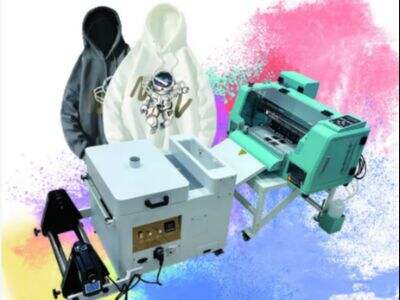
Xoto make A3 DTF printers. These printers is popular for custom jobs. Lots of folks use them to make special designs on t-shirts, bags, and stuff like that. A3 dtf printers works by putting designs on special transfer film. Then this film get pressed to the fabric with heat. The outcomes are bright colors and vivid, which makes products look really good! Custom orders matter a lot now because people wants items that shows their own style. Using A3 DTF printers make the job simple and quick for companies.
Why A3 DTF Printers Works Great for Custom Jobs in Wholesale?
A3 DTF printers are good for businesses needing custom stuff, special in wholesale areas. They can make good quality prints fast. For instance, if a shop need 100 t-shirts with unique design, an A3 DTF printer handle it without drop in quality. The way is speedy, so companies can hit tight due dates. Another thing why these printers is awesome is they print on lots of fabric types. Like cotton, polyster, or mixes, desktop dtf printersA3 DTF printers can do them all. This versatility let businesses offer more kinds of products to buyers. Plus, the prints last long. They hold up to washing and use without fade. That's key for customers who want things to stay nice. Also, A3 DTF printers is easy to use. Many can learn them quick, which save time and cash on training. Businesses can change colors and designs simple too. If a customer ask for another color, it done in few clicks. This bendy is important in custom jobs, where details count. And A3 DTF printers save money for wholesale work. They cut need for many machines because they print different designs in one go. So lower costs for companies, which mean better prices for people.
Where to Get Best Deals on A3 DTF Printers for Wholesale Stuff?
Getting best deals on A3 DTF printers is not hard if you know places to check. First, look at online shops. Sites like Xoto’s own page usually has sales and cuts. It's smart to compare prices from various sellers to pick the top one. Also, read reviews from other buyers. That help you pick which printer worth buying. Another spot for deals is trade shows. These are good for talking to makers and seeing new stuff. You can watch printers work and ask things. Sometimes firms give special low prices there, saving you some money. Don't skip local sellers. They might have nice offers and help with setup if needed. In addition, join online groups or forums can be useful. Lots of businesses share ideas on best printers and deals. Talking to others might find you secret good finds. So, know what you need is big. List features you want in a printer. This help choose right one for your budget. Last, think about future costs. A cheap printer sometimes end up more expensive from fixes or care. Buying a solid uv dtf printers from Xoto will pay back later.
Key Advantages of A3 DTF Printers for Custom Jobs
A3 DTF printers get really popular for custom orders, and there's some reasons. First, what DTF mean. It stand for Direct to Film. This way let you print nice designs right on special film. One big plus of A3 DTF printers is their size. They print on big sheets—up to A3. So you can make larger designs that pop and look sharp on t-shirts, bags, or hats. With Xoto's A3 DTF printer, you get clear colors and images that make custom stuff pro-looking.
Another plus is the process go quick. When you got many orders to do, speed matter. A3 DTF printers can do several designs in short time. This help your business keep up, specially in busy times. With this, A3 DTF printers let printing on various fabrics. If cotton, polyester, or blends, these handle all. This flexibility make them top pick for custom because you offer different products.
Cost-saving is key too. Xoto's A3 DTF printers help save on supplies and time. The ink in DTF is made to stay, so designs don't fade fast. That's good for customers wanting good quality. Last, A3 DTF printers easy for users. Even newbies can learn quick. This simple use let more folks join in making custom orders, bringing more ideas and enjoyment to business.
How to Get Max Quality with A3 DTF Printers in Wholesale Biz?
To get top quality from A3 DTF printer, follow some steps. First, pick good designs. Better design mean better end product. Ensure images clear and right format before print. Xoto say use at least 300 DPI for best. This make sure prints sharp and colorful on film.
Next, watch the ink you use. Xoto’s printers work best with special high-quality inks for DTF. Bad ink lead to dull colors and weak stick to fabric. Always check ink fresh and stored right. Regular care for printer is must too. Clean heads and nozzles to stop clogs and keep ink flow even. That improve print quality overall.
Another tip is right film type. Different DTF films out there, and picking good one changes a lot. Get films that match your printer and have nice coating for ink stick. Also, curing after print is important. Film need proper cure so ink hold to fabric. Use heat press with correct temp and press to make designs last and look good.
Last, test prints before big orders. Try on the fabric you use to spot problems early. Better fix now than deal with mad customers later. Following this, you max quality in custom orders and keep wholesale going strong.
Common Problems with A3 DTF Printers and Fixes
Like any gear, A3 DTF Printer have issues sometimes. One usual is clogged print heads. This happen if not used often or ink old. When heads clog, ink don't flow good, and designs look messy. To fix, clean heads regular. Xoto suggest run cleaning cycle every few weeks. If clogs show, use safe cleaning stuff to clear.
Another problem is bad color. Colors might not be bright enough. This from low ink quality or wrong settings. To solve, check ink levels and use Xoto's good products. Also, tweak settings for your film type. That can change colors a lot.
Sometimes designs peel after. Often from wrong curing. If heat press not set right temp or time, ink don't stick. Avoid by follow press settings. Xoto give guides to do it correct.
Last, watch software. Updates needed to fix bugs or better work. Keep software current help stop problems and run smooth. If can't fix issue, contact Xoto support. They give help and tips to keep printer in shape, so you fill custom orders easy.