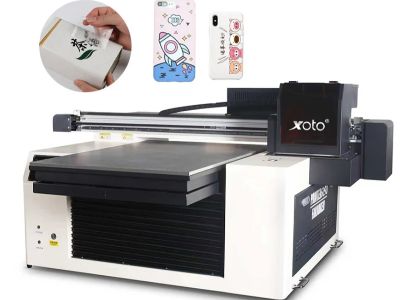
UV printing is a modern printing method that uses ultraviolet light to dry or cure ink as it is printed. This process works faster than traditional printing because the ink dries almost instantly. But what makes a UV printing system dependable? Simply put, consistent output is the key. This means that every print looks the same each time. Consistency is especially important for businesses, particularly wholesale buyers who need large quantities of identical prints. Companies like Xoto focus on ensuring their UV Printer systems deliver high-quality results consistently
Key Features of UV Printing Systems
When it comes to uv printer machine, there are several important features that make a big difference. First, the quality of the UV light is crucial. Strong, high-quality UV lights help the ink cure quickly and evenly. If the lights are not powerful enough, the ink may smudge or fail to adhere properly. Next, the type of ink used is equally important. Some inks perform better on certain materials than others. For example, printing on metal or glass requires specialized inks that adhere well to those surfaces. Another important factor is the printer's resolution. A higher resolution produces clearer and sharper images. If you need detailed designs, a printer with a higher DPI will deliver better results. Printer speed is also important. A faster printer can help meet tight deadlines, but it should still maintain excellent print quality. Finally, consider the software that comes with the printer. High-quality software improves print design, manages colors more accurately, and simplifies the printing process. Xoto printers include all of these features, helping ensure every print is high quality and visually impressive
How to Achieve Consistent UV Printing Quality for Wholesale Buyers
For businesses purchasing printed products in bulk, consistency is essential. One of the best ways to maintain consistent quality is by keeping the printer settings the same for every print job. This includes temperature, printing speed, and ink flow. If these settings change, the print quality may vary. Regular printer maintenance is also important. Just as a car requires routine servicing, a printer needs regular cleaning and inspections to operate properly. Worn or damaged parts can negatively affect print quality. Staff training also plays a significant role in maintaining consistency. Everyone operating the printer should understand how to use it correctly. Proper training helps prevent mistakes that can lead to poor-quality prints. Xoto provides customer training to help users achieve the best possible results. Testing is another essential step. Before starting a large production run, printing a sample allows you to identify and correct any issues. This gives wholesale buyers confidence that every print will meet their quality expectations
Innovations That Improve UV Printing Stability
UV printing has become increasingly popular because it uses special inks that cure quickly under ultraviolet light. One major innovation improving the stability of portable uv printer is the development of LED UV lighting. These lights consume less energy and generate less heat. This is important because excessive heat can damage the material being printed. Cooler operating temperatures help produce clean, sharp prints without smudging. Another significant innovation is the development of printers that automatically adjust to different printing materials. Many modern printers can now print on wood, metal, glass, and other surfaces. Advanced sensors detect the material being used and automatically optimize the printing process for the best results. Xoto is proud to incorporate these innovations into its printing systems. By using high-quality components and advanced technology, Xoto printers deliver consistent performance regardless of the printing material. The software has also become more intelligent, automatically adjusting ink flow and print settings based on the selected material. These innovations work together to make UV printing more reliable, efficient, and easier to operate
Where to Find Premium UV Printing Materials
Using high-quality materials is essential for achieving excellent UV printing results. At Xoto, we believe premium materials make a significant difference in the final product. One of the best places to find these materials is through trusted suppliers that specialize in printing products. It is important to choose suppliers who understand UV printing and offer a wide selection of products, including high-quality inks, specialty papers, and protective coatings. These materials are specifically designed to work with UV printers and produce durable, professional-looking prints. You can also explore online marketplaces that specialize in printing supplies. Many websites include customer reviews and ratings, making it easier to evaluate product quality. Look for materials that are specifically tested and recommended for UV printing. At Xoto, we also recommend reading product descriptions carefully to ensure the materials meet your project requirements. Some suppliers even offer sample products, allowing you to test them before placing a large order. Choosing the right materials results in better color accuracy, sharper images, and more durable prints. That is why investing in premium UV printing materials is so important. With high-quality supplies, your projects can stand out and leave a lasting impression. Xoto is committed to helping customers find the best materials for outstanding printing results
How to Solve Common UV Printing Problems
Even with high-quality printers and materials, problems can occasionally occur during UV printing. Fortunately, many of these issues are easy to fix. One common problem is ink that does not cure properly. This usually happens when the UV light is not strong enough or is positioned incorrectly. If your prints feel sticky or smudge easily, inspect the UV lights to ensure they are clean and functioning properly. In many cases, adjusting the light settings resolves the issue. Another common issue is inaccurate colors or faded prints. This may occur if the ink is old or if the printer settings are incorrect. Regularly check ink levels and replace old cartridges when necessary. Also, ensure the printer settings match the material you are printing on. Xoto printers include recommended settings for different materials to help achieve optimal results. If problems continue, consult the printer's manual or access online support resources. Many manufacturers, including Xoto, provide technical support for common printing issues and troubleshooting guidance. Most importantly, remain patient when troubleshooting. Taking the time to identify the cause of the problem usually leads to a simple solution. By learning how to resolve common UV printing issues, you can maintain consistent print quality and produce excellent results every time.
